The framework at a glance
- Plan your store
- Study a reference website
- Conversion foundations
- Set up your theme and build the first draft
- Landing pages
- Product page (PDP)
- Cart and checkout
- Speed, mobile and SEO
- Launch checklist
- First sales and marketing
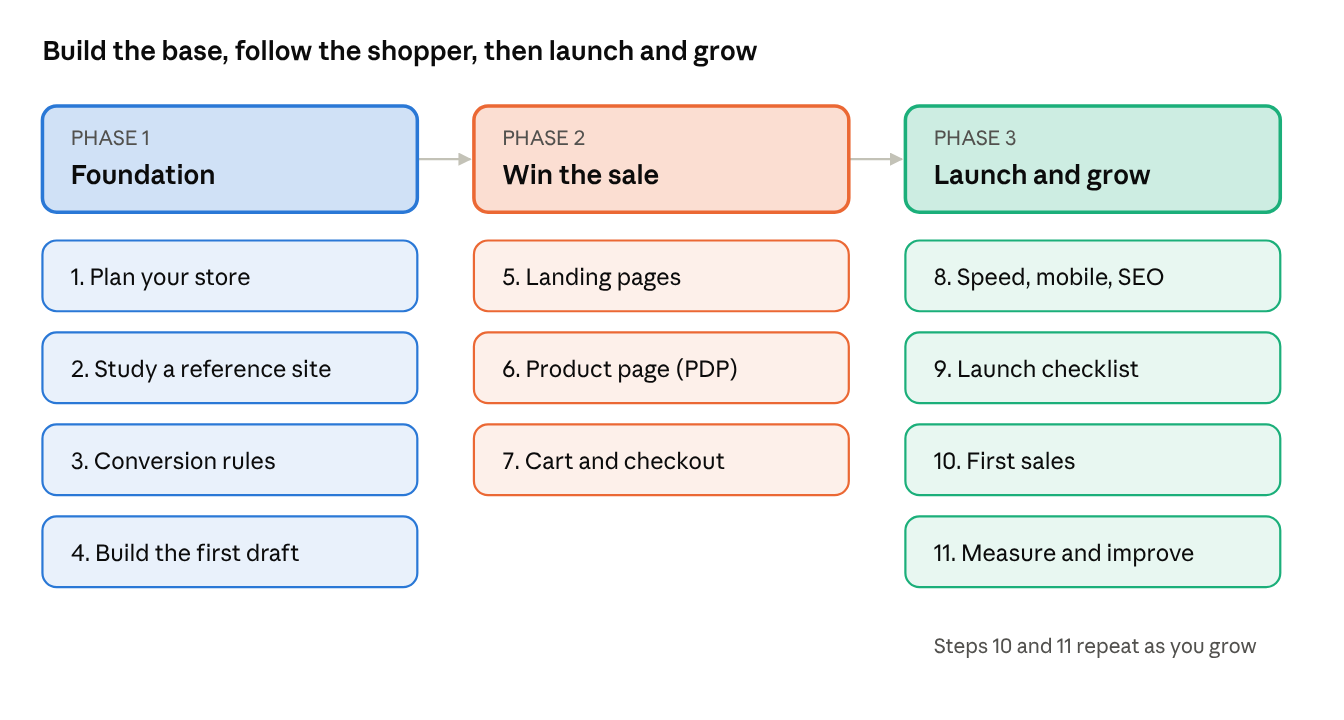
Steps 1 to 4 are the foundation. Steps 5 to 7 build the pages that win the sale. Steps 8 to 11 get you live and growing.
Step 1: Plan your store
Clarity before design. If you can't explain your store in one sentence, your visitor won't understand it either.
- Your offer: what you sell, and why someone should buy from you instead of Amazon or a competitor.
- Your customer: age, budget, what problem they have, and what makes them hesitate.
- Your pages: list every page before you design anything. Usually homepage, collections, product pages, about, contact, FAQ and policies.
- Your one goal per page: every page should push the visitor one step closer to buying.
Prompts:
"I sell [product] to [customer]. Write a one-line value proposition and three reasons to buy from me."
"List every page and section my Shopify store needs, in priority order."
"What are the top five objections a customer has before buying [product]?"
Exact prompt i used:
Type this:
"Here's my store idea. Brand name: [name]. I sell [products] to [customer] at [price range]. The feel I want: [3 to 5 words]. Pages I need: Home, Collection, Product, Cart, About, Contact, FAQ. Turn this into a store brief: a one-line value proposition, the top 5 buyer objections and how my store answers each, brand voice in 3 words, a colour palette of 3 colours with hex codes, 2 fonts, and every page with its single goal. Keep this brief as the reference for every next step in this chat."
Step 2: Study a reference website
Take inspiration from the structure, not the design. Copy the thinking, never the assets.
- What to study: section order on the homepage, how products are grouped, how the product page builds trust, how short their checkout feels.
- What not to copy: their logo, photos, text, brand colours or exact layout. That's their intellectual property and can get your store into trouble.
- Make it yours: note what works, then ask why it works. Rebuild that idea with your own brand, words and images.
- Pick 2 to 3 references, not one. Mixing ideas from several stores gives you something original.
Prompts:
"Here's the homepage structure of a store I like: [describe sections]. Explain why this order converts well."
"Turn these notes from three reference stores into an original homepage plan for my brand."
"What makes a DTC [category] store look premium and trustworthy?"
Exact prompt i used:
Type this:
"Here are the stores I like: [URL 1], [URL 2], [URL 3]. For each one, list every homepage section from top to bottom, what each section does to sell, and its design patterns: layout, image style, buttons and spacing. Then pick the patterns that would work for my brand from the brief. Use them as inspiration only: no copying of their text, images or logos."
Step 3: Conversion foundations
These five rules apply to every page you build. Say them once here, then refer back in every step.
- Clarity: in 5 seconds a visitor should know what you sell and who it's for.
- Trust: reviews, real photos, clear policies, a contact option and secure payment badges.
- One clear action: every section has one main button. Too many choices means no choice.
- Mobile first: most Shopify visitors shop on their phone. Design for the thumb, not the mouse.
- Speed: a slow page loses buyers before they even see your product.
The easy way to remember it: clear, trusted, simple, mobile, fast.
Prompts:
"Review my store plan against conversion best practices and list what's missing."
"What trust signals should a new Shopify store with zero reviews show?"
Exact prompt i used:
Type this:
"Using the brief and reference store analysis from earlier in this chat, create my store's conversion rulebook. For each of the five rules (clear, trusted, simple, mobile, fast), write exactly what it means for my store: the trust signals I must show, the button wording to use, what must be visible on a phone without scrolling, and what to avoid. Keep it to one page. We'll check every page against it in the next steps."
Step 4: Set up your theme and build the first draft
Choose a theme for how it sells, not how it looks in the demo.
- Start with a fast, modern theme. Shopify's free themes like Dawn are a solid base for most new stores.
- Check the must-haves: good mobile layout, product filters, quick add to cart, and built-in sections you'll actually use.
- Set brand basics first: logo, 2 to 3 colours, 1 to 2 fonts. Consistency looks professional.
- For a revamp, duplicate your live theme first. Work on the copy so your store never breaks.
- Where the Toolkit helps: custom sections and Liquid code that your theme doesn't include.
Exact prompt i used:
The shift : stop asking for advice and hand Claude the actual job. You already have the reference notes from Step 2 and the homepage plan. Now say "build it".
The one prompt to show on camera (same chat as Steps 1 and 2, so Claude already knows the brief and the reference stores):
"Using the store brief and the reference store analysis from earlier in this chat, build my complete store on a duplicate of my current theme, so I can preview it end to end. Do the full job, not a sample:
• Apply my brand colours and fonts across the whole theme, with a logo placeholder.
• Build the homepage with every section we planned, in order from announcement bar to footer, using the patterns from my reference stores.
• Create 8 dummy products with names, prices, variants, descriptions and placeholder images, in two collections: Bestsellers and New Arrivals.
• Build the collection page, product page, cart, About, Contact and FAQ pages, with real copy in my brand voice.
• Set up the main menu and footer menu.
• Use built-in theme sections first, and custom Liquid sections only where needed, all editable in the theme editor.
• Where photos or videos are missing, use placeholders labelled 'Replace me'.
When you're done, check every page on mobile against the five conversion rules and fix what you find. Then tell me how to preview the store, list everything you built, and list every placeholder I need to replace."
Step 5: Landing pages
Never send ad traffic to your homepage. One campaign, one page, one goal.
What a winning landing page has
Typical patterns on strong DTC stores. The prompt below checks your own competitors.
| Element | What top competitors usually do | What you should have |
|---|---|---|
| Headline | Matches the ad or the occasion word for word | One headline that repeats your ad's promise |
| Hero | Full-width festive or lifestyle visual with the offer on it | Your best product in use, offer visible without scrolling |
| Offer | One offer with a clear deadline | One offer, a real end date |
| Products | 4 to 8 hand-picked products, not the whole catalogue | Your bestsellers for that occasion, with quick add |
| Social proof | Reviews, customer photos, order counts | Real reviews or photos, even just 3 |
| Festive cues | Gift boxes, gift notes, delivery-by date | "Delivered before Diwali" date and a gift wrap option |
| Navigation | Main menu hidden or minimal | No main menu, one button repeated down the page |
| FAQ | Answers delivery, returns and COD | The same, in 4 short questions |
Exact prompt i used:
Type this:
"Study the landing pages of these competitor or reference stores: [URL 1], [URL 2], [URL 3]. List the sections, offer style and design patterns they use, and compare them with what my store has. Then build me a [occasion, e.g. Diwali festive] landing page on my theme following the strongest patterns: a headline and hero for the occasion, one clear offer with a real end date, my best products for this occasion from my store with quick add, reviews, gifting and delivery-by-date notes, a short FAQ, and one button repeated down the page. Hide the main menu on this page, use my brand colours and fonts, and use placeholders labelled 'Replace me' where images are missing. Save it as a reusable template so my next festive page takes one prompt, then tell me how to preview it."
Prompts (copy-paste):
"I'm running a [Diwali / Black Friday / summer] sale on [product type]. Build a landing page using my products, with one offer ending on [date] and a 'delivered before [date]' note."
"Here's my ad copy: [paste]. Build a landing page whose headline and offer match this ad exactly, using my products."
"Turn [product name] into a single-product landing page for Instagram ads, with benefits, reviews, an FAQ and one Buy Now button."
Step 6: Product page (PDP)
This is where the sale is won or lost. Answer every question before the customer has to ask it.
What a winning product page has
Typical patterns on strong DTC stores. The prompt below checks your own competitors.
| Element | What top competitors usually do | What you should have |
|---|---|---|
| Gallery | 6 to 8 images, a video, zoom | The same, plus the product in hand for scale |
| Above the fold | Name, rating, price, variants, Add to Cart | All of it visible on a phone without scrolling |
| Description | Benefits first, short bullets | A 2-line hook and 5 benefit bullets |
| Trust near the button | Delivery date, returns, COD, secure payment | The same, right under Add to Cart |
| Reviews | Star summary and photo reviews | Photo reviews with a verified buyer badge |
| Upsell | Frequently bought together, bundles | One bundle or pairing per product |
| Mobile | Sticky Add to Cart bar | Sticky Add to Cart bar |
| Details | Collapsible tabs | Tabs for details, care and FAQ |
Exact prompt i used:
Type this:
"Study the product pages of these competitor or reference stores: [URL 1], [URL 2], [URL 3]. List every section and trust element they use from top to bottom, and compare it with my current product page. Then rebuild my product page template with the strongest patterns, for every product in my store: an image gallery with zoom and a video slot; name, rating, price, variants and Add to Cart visible on a phone without scrolling; a benefit-first description with a 2-line hook and 5 bullets; a delivery date, returns and COD note under the button; reviews with photos; 'Frequently bought together'; collapsible tabs for details, care and FAQ; and a sticky Add to Cart bar on mobile. Use the buyer objections from my brief and placeholders labelled 'Replace me' where needed, then show me one product before and after."
Prompts:
"Compare my product page for [product] with [competitor product URL] and list everything they have that I don't."
"Rewrite the description of [product] benefit-first: a 2-line hook, 5 bullets, and an FAQ that answers the top 4 buyer objections."
"Add a delivery date, returns and COD note right under the Add to Cart button on all my product pages."
Step 7: Cart and checkout
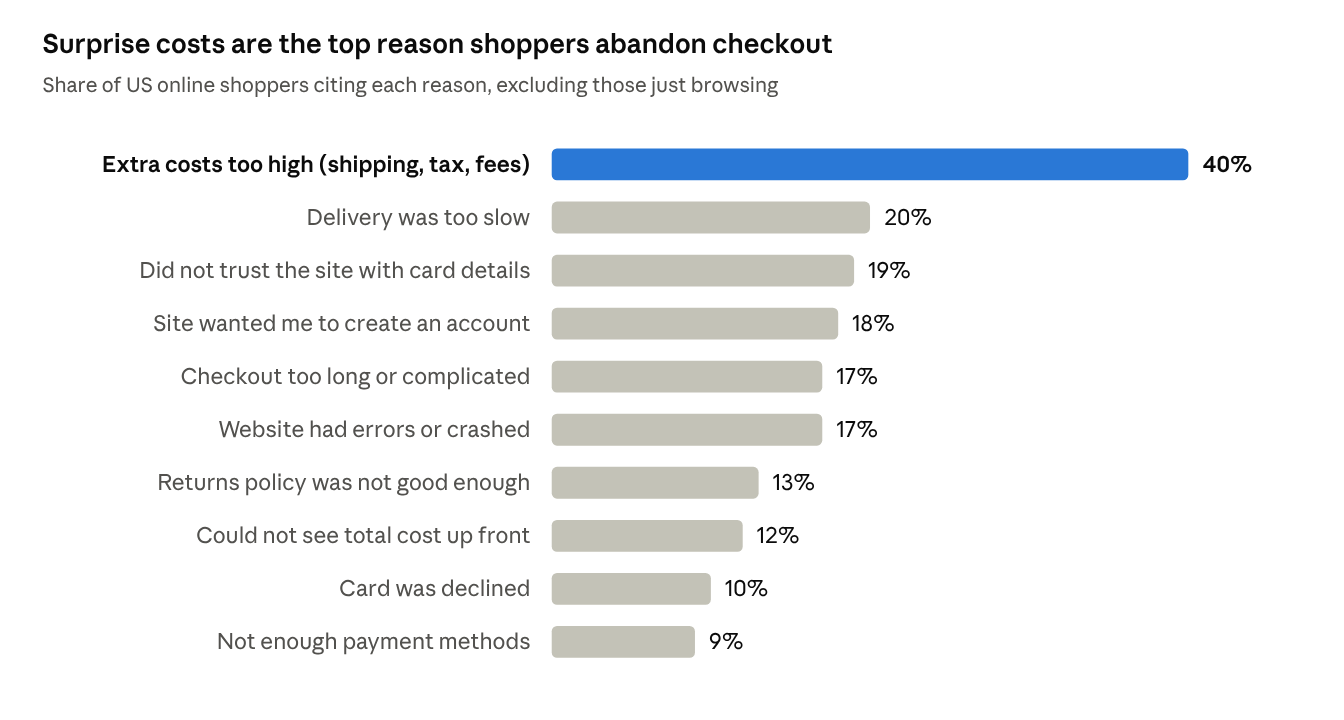
Most shoppers who add to cart never pay. Every extra step or surprise cost loses more of them.
Exact prompt i used:
Type this:
"Look at how these competitor stores handle the cart and checkout: [URL 1], [URL 2]. Then optimise mine with the best of what they do: a free shipping progress bar for orders over ₹[amount], one low-cost upsell in the cart, shipping costs shown before checkout, guest checkout on, and UPI, cards and COD offered. Write a 3-email abandoned checkout sequence too. Then list what you changed and what I need to switch on in Shopify settings myself."
Prompts:
"Why might customers be abandoning my checkout? Check my cart, shipping settings and payment methods, and list the fixes in order of impact."
"Add a free shipping progress bar to my cart for orders over ₹[amount]."
"Write a 3-email abandoned checkout sequence for my [brand] store, in a friendly tone."
Step 8: Speed, mobile and SEO
A beautiful store that loads slowly is an empty store.
Exact prompt i used:
Type this:
"Audit my whole store for speed, mobile and SEO, and fix what you can. Compress oversized images, flag apps and sections that slow the theme, write a unique SEO title and meta description for every page and collection, add alt text to every image, and if this is a revamp, set up redirects from my old URLs. Then list what you fixed and what I need to do myself."
Prompts:
"Write SEO titles and meta descriptions for all my collections and my top 10 products."
"Which apps and theme sections are slowing my store down, and what can I safely remove?"
"Write alt text for every product image in my store."
Step 9: Launch checklist
Most launch problems are small and avoidable. Check everything once, as a customer would.
Exact prompt i used:
Type this:
"Write a clear shipping and returns policy for my Indian candle store: delivery in 4 to 7 days, free shipping over ₹999, COD available, returns within 7 days only for damaged items. Simple language, no legal jargon."
Prompts:
"Give me a pre-launch checklist for my store, ordered by priority, and tell me which items are already done."
"Write my shipping, returns, privacy and terms policies for these terms: [your terms]."
"How do I place a test order in Shopify without using real money?"
Step 10: First sales and marketing
A live store with no traffic is a shop on an empty street. Pick one or two channels and do them well.
Exact prompt i used:
Type this:
"Create a discount code WELCOME10 for 10% off, for first-time customers only, valid for the next 30 days."
Prompts:
"Create a discount code [CODE] for [x]% off, for first-time customers only, valid for 30 days."
"Write a 3-email welcome sequence for new subscribers to my store."
"Plan my first 30 days of marketing with a budget of ₹[amount] on [Instagram / Google]."
Bonus: Make your usage last
Claude doesn't count messages. It counts how much it reads and writes. Keep what it reads small and your plan lasts.
1. What happens when you send a prompt
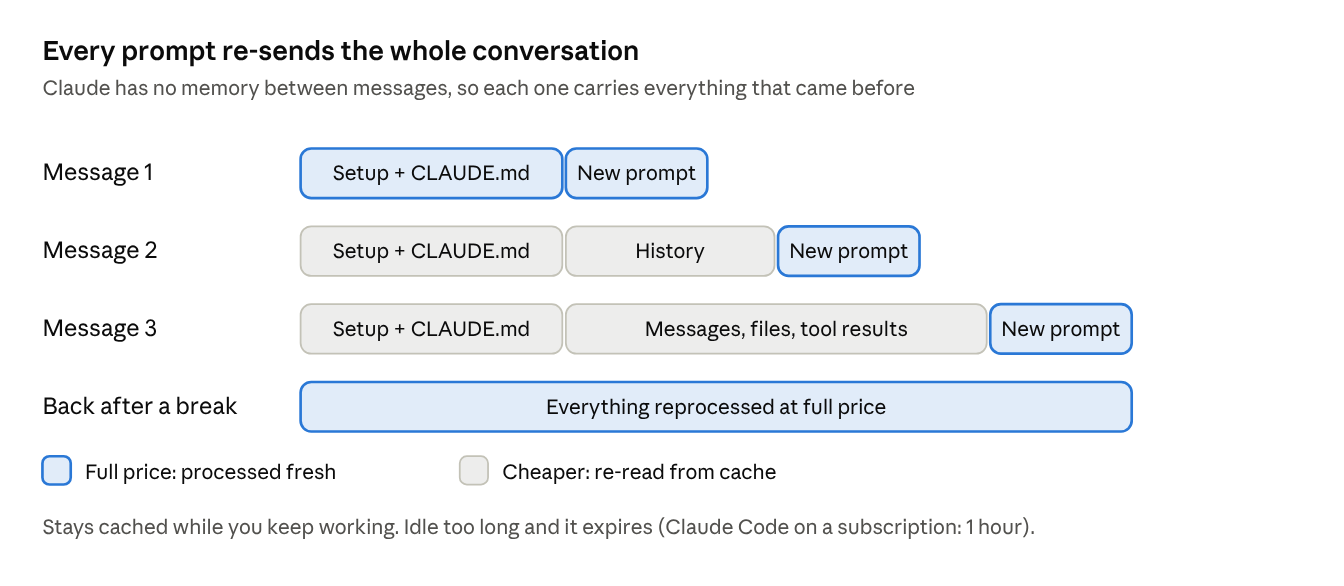
- Claude has no memory between messages. Every time you hit send, the whole conversation goes back to the model: its instructions, your project files and CLAUDE.md, every earlier message, every file it read, every tool result, and then your new line.
- So a tiny prompt can be expensive. "Make the button red" in a chat that has been open all day still pays for the whole day's history.
- Caching softens this. The unchanged start of the conversation is re-read at a cheaper cached rate, and only the new part is fully processed. But the match must be exact from the top: change something early and everything after it is processed again.
- The cache expires when you go idle. On a Claude subscription, Claude Code keeps the main conversation cached for 1 hour (subagents get 5 minutes). Come back after a long break and your first message reprocesses everything at full cost.
- What breaks the cache mid-task: switching models, connecting or removing an MCP server, compacting, and upgrading Claude Code. Pick your model at the start and stick with it.
- When Claude edits a file, the file isn't re-sent from scratch. Claude Code adds a short note that it changed and re-reads it only if needed. What you pay for is the reading, the writing and the thinking: thinking tokens are billed as output.
2. One budget for everything
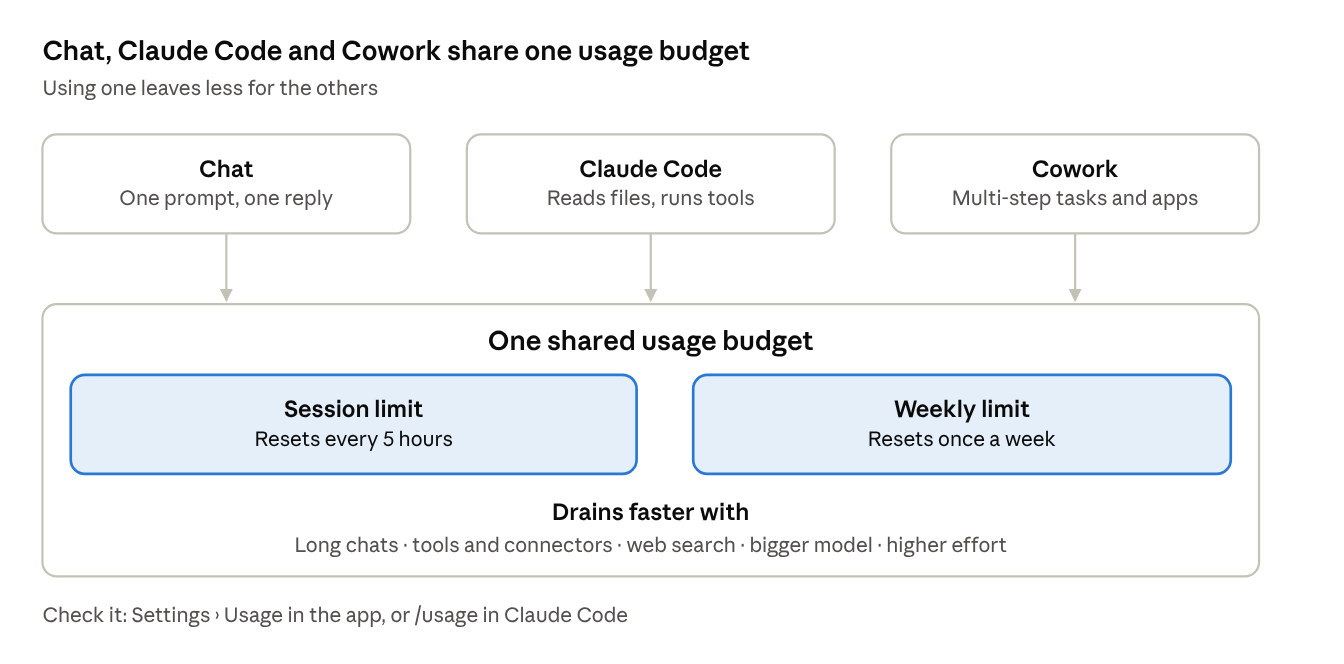
- Two limits run at once: a session limit that resets every 5 hours, and a weekly limit.
- Chat, Claude Code, Claude Desktop and Cowork share the same pool. A heavy Cowork morning means less Claude Code in the afternoon.
- What drives usage: how long and complex the conversation is, which features are on (tools, connectors, web search), the model, and the effort level.
- Check it: Settings > Usage in the app, or /usage in Claude Code. In Claude Code it also shows what's eating your plan (skills, subagents, MCP servers, a bloated CLAUDE.md) with suggested fixes.
- When you hit the limit: wait for the reset, upgrade, or turn on usage credits. Switching models won't help after a session limit, because it's shared across models.
3. Pick the right tool for the job
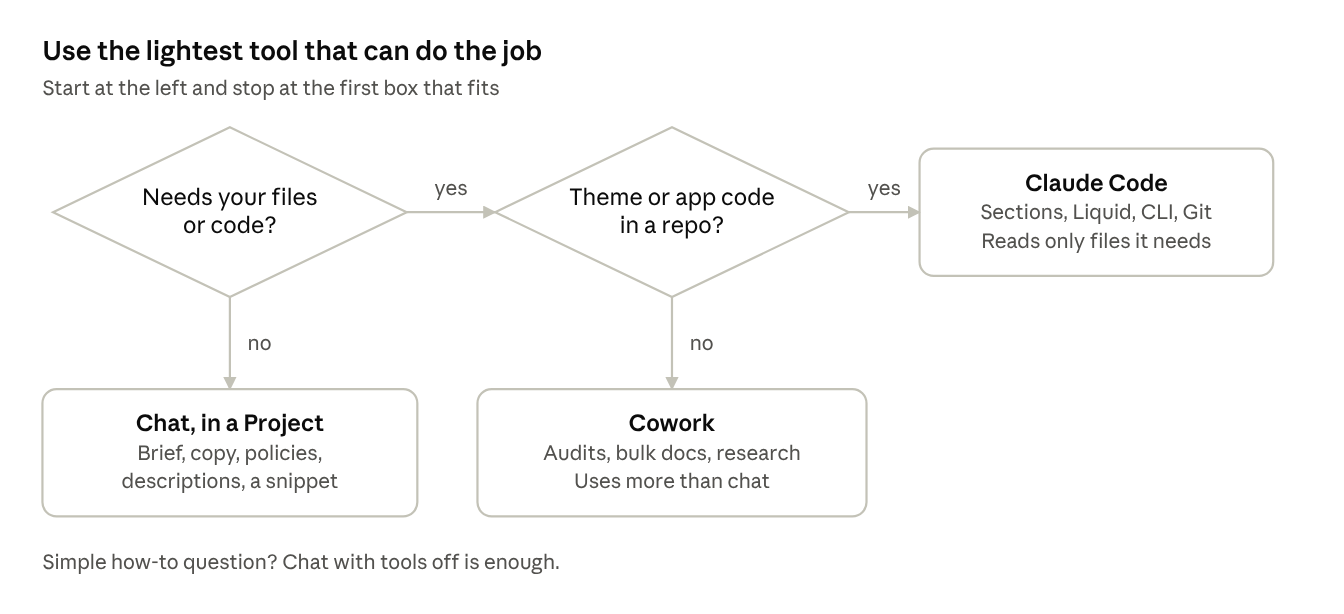
| Shopify job | Best tool | Why |
|---|---|---|
| Store brief, copy, product descriptions, policies, emails, a quick Liquid snippet | Chat, inside a Project | Cheapest: one prompt, one reply |
| Theme code, custom sections, edits across many files, Shopify CLI, Git | Claude Code | Reads only the files it needs, tests its own work |
| Multi-step work across files and apps: audits, bulk documents, research packs | Cowork | Does the whole job, but uses more of your plan than chat |
| A simple "how do I…" question | Chat, tools off | No reason to pay for an agent |
4. Habits that save usage
In chat
- Use a Project for your brief, reference notes and conversion rules. Projects only load the relevant parts into each conversation.
- Keep project instructions short and remove files you no longer use.
- Start a new chat when the topic changes. Very long chats get auto-summarised, and that costs extra usage.
- Batch your asks: three questions in one message, not three messages.
- Turn off what you don't need: connectors, web search, extended thinking, high effort.
In Claude Code
- /clear between unrelated tasks. It costs nothing. Run /rename first, and /resume to come back later.
- /compact at natural breaks, not mid-task. It reads the whole conversation to summarise it, so it isn't free. Tell it what to keep: /compact Keep decisions and files changed, drop logs.
- Went the wrong way? /rewind (or double-tap Esc) instead of arguing with it. Press Esc the moment it heads off course.
- Plan mode (Shift+Tab) for big jobs. Fixing a plan costs almost nothing. Fixing finished code costs a lot.
- Name the file. "Add a delivery note under Add to Cart in sections/main-product.liquid" beats "improve my product page", which triggers a scan of the whole theme.
- Sonnet by default, Opus for hard problems like architecture or a stubborn bug.
- Keep CLAUDE.md under 200 lines. It loads on every turn. Move one-off workflows into skills, which load only when used.
- Prefer CLI tools (Shopify CLI, gh) over MCP servers, and switch off unused servers in /mcp. Run /context to see what's taking space.
- Send noisy work to subagents: theme check output, logs, doc lookups. Only the summary comes back to your main conversation.
- Watch idle drains: scheduled tasks and loops resend your full context every time they run.
In Cowork
- Batch related work into one session, and give the full brief up front so it doesn't loop.
- Use chat for anything that doesn't need file access or long multi-step execution.
5. Shopify setup that saves tokens
- Install Shopify's AI Toolkit in Claude Code: /plugin marketplace add Shopify/shopify-ai-toolkit, then /plugin install shopify-plugin@shopify-ai-toolkit. Claude checks live Shopify docs and validates code against current schemas, so fewer wrong guesses and fewer fix-up rounds.
- Work locally on a duplicate theme with Shopify CLI (shopify theme dev, shopify theme check), and commit to Git so a mistake is a rollback, not a rebuild.
- Give the repo a short CLAUDE.md so Claude never has to rediscover your store:
# [Brand] Shopify theme (Dawn base)
- Brief and conversion rules: docs/brief.md (read only when needed)
- Work only on the duplicate theme. Never push to live.
- Sections in /sections, snippets in /snippets, all editable in the theme editor
- After edits, run shopify theme check and show only errors
# Compact instructions
Keep files changed, decisions made and open bugs. Drop logs.
Prompts:
"Plan first: list the files you'll change and why, in 5 lines. Wait for my OK before editing."
"Only open sections/main-product.liquid. Add [change]. Don't touch other files. Show me the diff."
"Run theme check in a subagent and give me only the errors, grouped by file."
What to tell viewers: Claude re-reads your whole conversation every time you send something. Short focused sessions, specific prompts and the right tool for each job are what make your plan last.